










Lucky Vibe icon on a dark tileLucky Vibe web appAdd to your home screen in secondsOpen
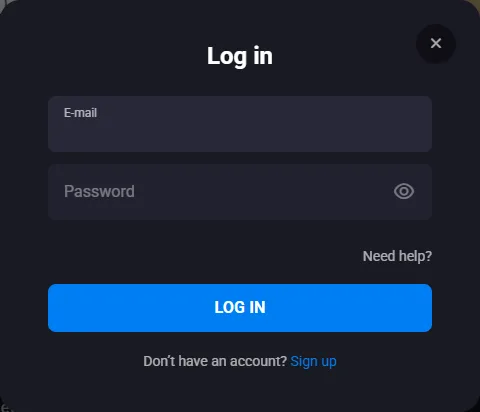
Lucky Vibe Casino login window with email and password fields and the Log In button
Welcome Package
A$5,000 + 300 FS
First deposit: 100% up to A$1,000
I am 18 years old and I accept the Terms and Conditions and Privacy Policy I agree to receive Lucky Vibe news and promotions
Exclusive games iconExclusiveNew games games iconNew gamesSlots games iconSlotsBonus Buy games iconBonus BuyJackpot games iconJackpotInstant Win games iconInstant WinLive Casino games iconLive CasinoTable Games games iconTable Games
Search
TOP games iconTOPShow All

Lucky Vibe Casino Login

Our Lucky Vibe casino login needs only two things: the email address and the password you chose when you registered. Below we cover what to prepare before the first visit, how to sign in on a computer or phone, how to reset a password and what each common error means. If something still blocks you, our live chat team is online 24/7.

Log In to Lucky Vibe
01

Before Your First Lucky Vibe Casino Login

Lucky Vibe Casino login window with E-mail and Password fields

You can only sign in once an account exists, so the first step is a short sign up form. It asks for:

  • an email address — this becomes your login name;
  • a password you will remember but nobody else can guess;
  • your phone number and country;
  • the account currency (choose AUD);
  • confirmation that you are 18 or older.

There is also an optional field for a bonus code. Keep the email and password somewhere safe, for example in a password manager: the Lucky Vibe casino login screen never asks for your phone number or username, only for these two details. When you register, use an inbox you check often, because password reset instructions are sent there.

02

Signing In with Your Email and Password

On a desktop or laptop the Lucky Vibe casino login takes under a minute:

  1. 1Open our site in any modern browser.
  2. 2Press Log In in the top corner of the page.
  3. 3Type your email in the E-mail field.
  4. 4Type your password in the Password field, keeping an eye on capital letters.
  5. 5Press Log In again to open your account.

Your balance, active bonus and recent games appear straight away. If you use the same device every day, the browser can remember your email so you only type the password. On a computer shared with family or friends, avoid saving anything and always sign out at the end.

The form is the same on every screen size, so once you know it on a laptop, a tablet holds no surprises. Your balance at the top of the page is the sign that you are in; if you still see the Log In button, the details were not accepted.

Log In Now
03

Lucky Vibe Casino Login Australia from the Home Screen

Lucky Vibe web app on a phone home screen with the casino lobby open

Most players across Australia come back to us from a phone, and the fastest way in is our web app. It is not a store download: it installs from the mobile browser and opens the site in its own window.

  • Android: open our site in Chrome or a similar browser, tap the three-dot menu, choose Add to Home Screen and press Install.
  • iPhone: open our site in Safari, tap Share, choose Add to Home Screen and press Add.

Tap the new icon, press Log In and enter the same email and password you use on a computer. The session stays open until you sign out or the browser clears its data, so on your own device you rarely need to repeat the Lucky Vibe casino login Australia steps. One account works on every phone, tablet and laptop.

04

Resetting a Forgotten Password

A forgotten password is the most common reason a Lucky Vibe casino login fails, and it is the easiest to fix:

  1. 1Press Log In, then follow the Need help? link under the form.
  2. 2Choose Reset Password.
  3. 3Enter the email address linked to your account.
  4. 4Open the message we send and follow the instructions to set a new password.

If the email does not show up within a few minutes, look in the spam or promotions folder. Pick a new password you have never used on another site; the old one stops working as soon as the forgot password process is complete. Then return to the sign-in form, enter the email with the new password and you are back in your account with the balance untouched.

05

Login Errors and How to Fix Them

What you seeWhat to do
Wrong email or passwordCheck for typos and caps lock, then try again or reset the password
The page reloads and nothing happensClear cookies for our site or open it in a private window
You are signed out after a few minutesCheck that the browser does not delete site data on exit; turn that setting off for us
The page does not load at allSwitch between Wi-Fi and mobile data, update the browser and retry
None of the above helpsContact our support team in live chat or at support@luckyvibe.com

For your security, never share your Lucky Vibe casino login details with anyone, including people who claim to work for us. Our staff never ask for your password in chat or by email. If you think someone else has used your account, change the password at once and let support know.

06

Lucky Vibe Casino Login Questions

1I forgot which email I registered with — what now?

Open live chat or write to support@luckyvibe.com. Our team helps you find the account linked to you.

2Can I sign in with my phone number?

No. The phone number is part of the registration details, but the sign-in form uses only your email and password.

3How do I sign out safely on a shared computer?

Use the Log Out option in your profile, then close the browser window. Do not let the browser save your password on a device other people use.

4Will my bonus wait while I am locked out?

A bonus stays active for 3 days. If you cannot get in, reset the password straight away or ask support for help, so the offer does not run out.

5Can I close my account instead of logging in again?

Yes. Send a request to closeaccount@luckyvibe.com or ask in live chat, and we close the account for you. The same Lucky Vibe casino login Australia support channels handle self-exclusion requests.